
DND – Using the ‘Do Not Disturb’ feature on your cloud phone

If you’re new to the Cloud and are still trying to figure out what all the features are on your handset. Don’t worry, you’re not the only one.
In this blog, we will discuss the Do Not Disturb (DND) feature on your handset. This may seem self-explanatory and an unimportant topic to discuss, however, many of our support calls which come through are related to this tiny button which causes a lot of problems.
How the ‘Do Not Disturb’ (DND) feature works
The Do Not Disturb (DND) feature on your Cloud phone is a button that turns your phone off, without turning it off. When DND is enabled, you can still make calls, but your phone won’t ring and incoming calls will automatically go to voicemail. All calls you receive while DND is enabled are logged under your Recent Calls list.
Many people don’t ever use the DND button on their Cloud phone and because of this, when the button gets turned on accidentally, you may think you have a problem with your Cloud handset.
Once the DND mode is activated, you will notice an icon on your phone’s screen which looks like a red no-entry sign. This is to let you know that no calls can be received on your handset. If you are new to VoIP, or just got a new desk phone, then it’s easy to assume that something is wrong with the phone’s handset, and this is where the problems stem from.
Turning off Do not Disturb
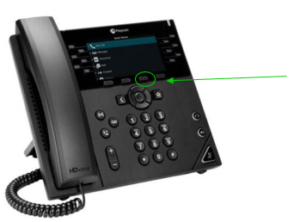
However, turning DND off is very simple. All you must do is press the DND button again and all everything is restored back to normal.
It’s really that simple. The same way you turned DND on is the same way you turn it off. Therefore, we wrote this blog just as a reminder that if you find your Cloud phone is not working, then always check the (DND) button is not activated.
See the image below for some extra clarification:
For more information, get in touch today!
Call us on 0345 389 2310 or click the link below.

Get in touch
Our team is available Monday to Friday.Let’s Talk….
Call, email or use the form below and we’ll come back to you the same business day.
Service Desk
Tel: 0345 389 2310 Option 1
Email: service.desk@tech-ip.co.uk (opens email application)
Accounts
Tel: 0345 389 2310 Option 3
Email: billing@tech-ip.co.uk (opens email application)
Sales
Tel: 0345 389 2310 Option 2
Email: sales@tech-ip.co.uk (opens email application)
Anything Else
Tel: 0345 389 2310 Option 4
Email: enquiries@tech-ip.co.uk (opens email application)