
Meet Zoom AI Companion: Your Smartest AI Assistant for Work


What Is Zoom AI Companion and Why Does It Matter?
Zoom AI Companion is a generative AI assistant embedded across the Zoom platform, including Meetings, Team Chat, Mail, Docs, Phone, and Whiteboard. Instead of simply hosting meetings, Zoom now helps you understand, summarise, and act on what happens in them. Many professionals spend a significant portion of their workday attending meetings, responding to messages, and catching up on conversations they may have missed. Zoom AI Companion addresses this challenge by automating routine tasks and surfacing key insights when they matter most.
Key benefits include:
- Automatically generated meeting summaries and action items
- Smart in-meeting questions and catch-up features
- AI-assisted chat and email composition
- Instant chat summaries to reduce information overload
- Brainstorming and idea organisation using Whiteboard
By reducing manual note-taking and follow-up work, Zoom AI Companion helps teams stay aligned and productive without adding complexity.
How Zoom AI Companion Supports Your Workday
Zoom AI Companion fits naturally into how you already use Zoom. Once enabled by an administrator, you’ll see the AI Companion icon appear within meetings, chat windows, and other Zoom tools. This seamless support helps reduce meeting fatigue while improving accountability and follow-through.
Before Meetings AI Companion can help you prepare by summarising previous discussions, generating agendas, and organising relevant context. This ensures you start meetings with clarity and confidence.
During Meetings If you join late or need clarification, you can ask the AI meeting assistant to recap what’s been discussed so far. It can also answer questions about meeting content in real time without interrupting the flow of conversation.
After Meetings Once a meeting ends, AI Companion automatically produces a structured summary, highlights key topics, and lists next steps. These summaries make it easier to share outcomes with stakeholders and keep projects moving forward.
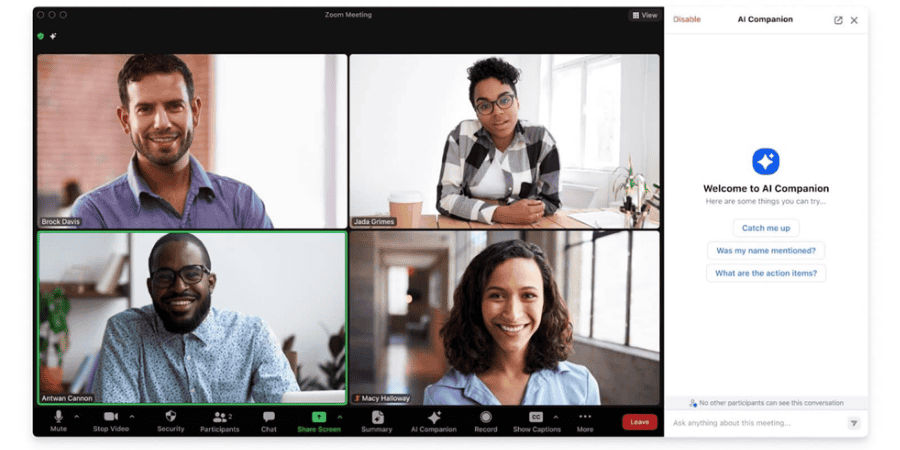
Smarter Communication with Zoom Productivity AI
Zoom AI Companion also enhances everyday communication. When inboxes and chat channels become overwhelming, AI Companion can:
- Summarise long chat threads instantly
- Help draft replies with the right tone and length
- Suggest responses to unread messages
- Assist with email composition directly within Zoom
This Zoom productivity AI reduces cognitive load and helps users respond more efficiently, particularly during busy periods with back-to-back meetings.
AI Collaboration Tools Built for Modern Teams
Collaboration works best when ideas flow easily, and decisions are captured clearly. Zoom AI Companion supports teamwork by helping groups brainstorm, organise ideas, and turn conversations into action.
Using Zoom Whiteboard, AI Companion can generate ideas based on prompts and group them into logical categories. This makes creative sessions more productive and helps teams move from ideation to execution faster.
In chat channels, AI Companion can also detect scheduling intent and streamline the process of setting up meetings, reducing unnecessary back-and-forth messages.
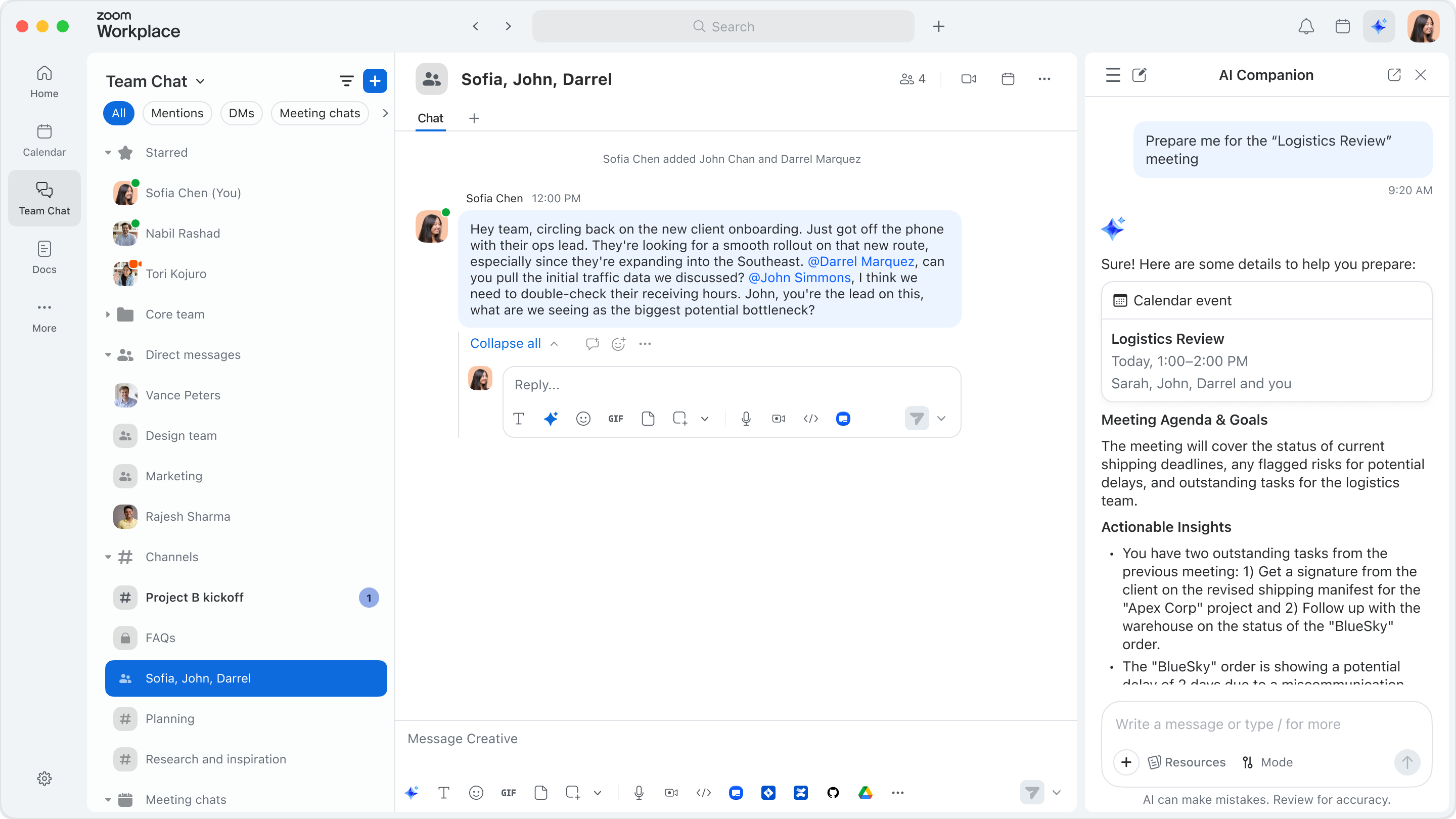
Want to see how these AI collaboration tools could work for your team in real life? Book a free 30-minute webchat and we’ll guide you through Zoom AI Companion, show practical use cases, and answer your questions. It’s a relaxed, no-pressure session designed to help you understand what’s possible and how to get the most value from it.

How Zoom AI Companion Will Continue to Evolve
Zoom is expanding AI Companion beyond summaries and suggestions. Future developments focus on agentic AI, where the assistant can complete multi-step tasks on your behalf. With these enhancements, Zoom AI Companion moves closer to acting like a digital assistant that not only understands conversations but also helps drive outcomes. Planned capabilities include:
- Preparing meeting briefs automatically
- Consolidating insights from past meetings and chats
- Finding relevant documents from connected applications
- Assisting with support tickets during meetings
- Providing coaching feedback on communication and presentation skills
Responsible AI and Data Privacy
Zoom has taken a clear stance on responsible AI use. Customer content, including audio, video, chat messages, screen sharing, and attachments, is not used to train Zoom’s or third-party AI models. Administrators retain control over which AI Companion features are enabled across their organisation, and meeting hosts can manage AI features on a per-meeting basis. Participants are informed when generative AI features are in use, ensuring transparency and trust.
This approach allows organisations to benefit from AI collaboration tools while maintaining control over data usage and privacy. For further reading, these resources are helpful: https://www.zoom.com/en/products/ai-assistant/ & https://support.zoom.com/hc/en/sections/360014300840-AI-Companion-Support

Zoom AI Companion FAQs
Zoom AI Companion is an intelligent assistant built into the Zoom platform that helps users manage meetings, conversations, and follow-ups more efficiently. It understands the context of discussions and turns spoken conversations into structured summaries, highlights, and action items. Instead of manually taking notes or rewatching recordings, users receive clear outcomes automatically. This allows teams to focus on decisions and collaboration rather than admin tasks. Because the assistant works directly inside Zoom, it fits naturally into existing workflows without requiring additional tools or complex setup.
Zoom includes its productivity AI features with many paid Zoom plans at no extra cost. However, access depends on the specific licence type and how the account administrator configures settings. Some organisations may choose to enable or disable certain AI capabilities based on internal policies. If users cannot see these features, they should speak with their account owner or administrator. This flexible approach allows organisations to control adoption while still giving teams access to powerful AI-driven productivity tools when appropriate.
AI collaboration tools help individuals stay focused and organised during busy workdays. By automatically summarising meetings, they remove the need to review long recordings or take detailed notes. They also assist with drafting messages and emails, speeding up communication and reducing mental effort. As a result, users spend less time on repetitive admin work and more time on meaningful tasks. These tools help individuals respond faster, prioritise work more effectively, and maintain productivity without feeling overwhelmed.
These tools support teamwork by keeping everyone aligned and informed. They generate shared meeting summaries that clearly outline decisions, responsibilities, and next steps. This reduces confusion and limits the need for follow-up clarification. Team members who miss meetings can quickly catch up without relying on others for updates. Because information is presented clearly and consistently, teams collaborate more smoothly and move projects forward with confidence, accountability, and a shared understanding of priorities.
Zoom AI Companion follows strong principles around responsible AI and data protection. Zoom states that it does not use customer content such as audio, video, chat messages, or shared files to train external AI models. Administrators also retain control over which AI features are active across their organisation. Users receive notifications when AI tools are in use, which promotes transparency. This approach allows organisations to benefit from intelligent automation while maintaining trust, compliance, and confidence in how data is handled.
This intelligent assistant significantly reduces the need for manual note-taking, but it does not aim to replace human input entirely. It captures key discussion points, decisions, and action items accurately, which saves time and improves consistency. However, users may still want to review summaries or add context for complex topics. When combined with human oversight, the assistant provides a balanced approach that improves efficiency while ensuring accuracy and clarity across meetings and follow-up tasks.
Yes, the AI meeting assistant supports work beyond live meetings. It summarises chat conversations, helps draft messages and emails, and assists with organising ideas in shared workspaces. This means users benefit from AI support throughout the day, not just during calls. By reducing time spent catching up on messages or writing responses, the assistant helps maintain momentum across multiple tasks. Its availability across Zoom tools makes everyday work more streamlined and manageable.
Zoom AI Companion is deeply integrated into the Zoom ecosystem. It understands meeting context, chat history, and collaboration workflows without requiring users to switch platforms.
Because it is built into the tools people already use, adoption is easier, and productivity gains happen faster.
Get in touch
Our team is available Monday to Friday.Let’s Talk….
Call, email or use the form below and we’ll come back to you the same business day.
Service Desk
Tel: 0345 389 2310 Option 1
Email: service.desk@tech-ip.co.uk (opens email application)
Accounts
Tel: 0345 389 2310 Option 3
Email: billing@tech-ip.co.uk (opens email application)
Sales
Tel: 0345 389 2310 Option 2
Email: sales@tech-ip.co.uk (opens email application)
Anything Else
Tel: 0345 389 2310 Option 4
Email: enquiries@tech-ip.co.uk (opens email application)